
Ajutor › Builder (Design and Pages)
Global Styles > Fonts
Table of Contents
Getting Started
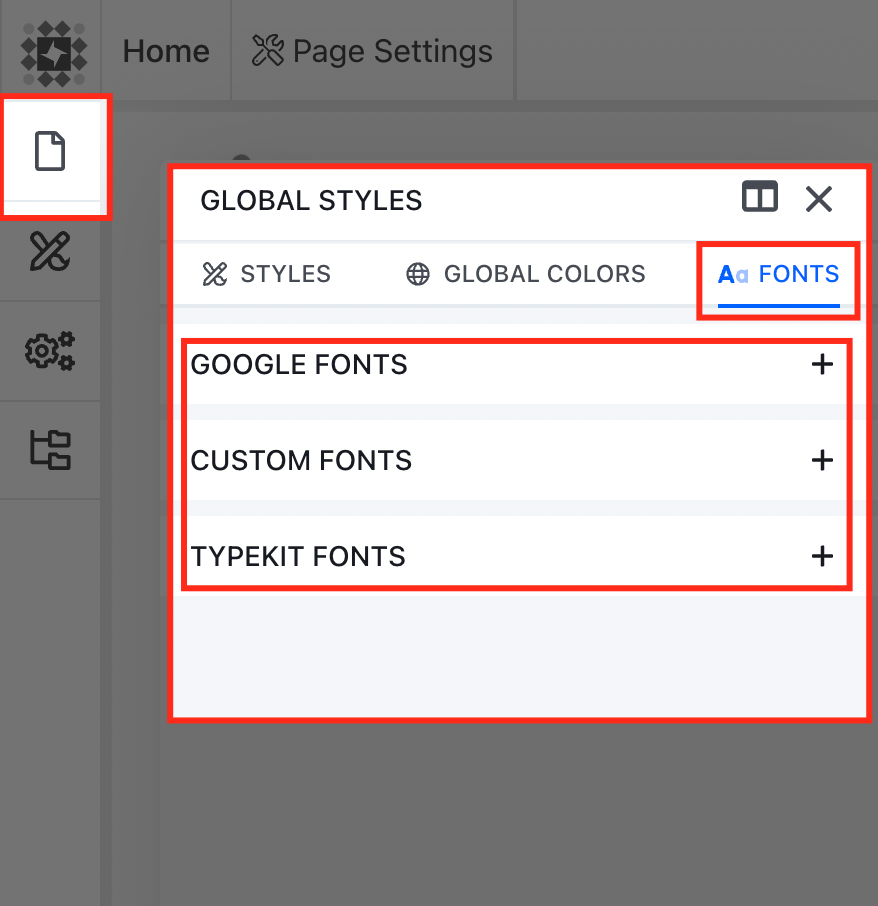
In this article, you will learn about how all the Sections of Aa Fonts and their editing options work under Global Styles. Inside the Aa fonts, you will find three types of fonts that you can use: Google Fonts, Custom Fonts, and Typekit Fonts. To know the process, follow the instructions below.
Global Styles
To know the basic of Global Styles, refer to the article below —
Global StylesSections of Aa Fonts under the Global Styles
Inside the Styles under Global Styles settings, you will find these below options —
- Google Fonts
- Custom Fonts
- Typekit Fonts
To learn how to find these sections, refer to the Gif & Image below —
Google Fonts
You can add Google Fonts to your site by expanding the Google Font option and clicking on
+ Add New.
Follow the steps shown in the GIF below to see how it is done:
Custom Fonts
If you have custom fonts saved on your device, you will be able to add them to your site using the Custom Fonts option. You can upload custom fonts in the following formats:
- WOFF
- WOFF2
- TTF
Refer to the GIF below to see how the Custom Fonts option:
Typekit Fonts
You will be able to add fonts from Typekit using this option.
Refer to the GIF below to see how the Custom Fonts option:
Related Articles
Global Styles Global Link colors | Global StylesAi nevoie de ajutor? Scrie-ne.