
Ajutor › Builder (Design and Pages)
Multi Slug in Regular Pages
Table of Contents
Getting Started
The Multi Slug feature allows you to put multi-part slug( eg: /en/regular-page-1 ) in your regular pages. This article covers how you can add multi-slug to your web pages.
Add Multi-Slug to a Regular Page
To add a multi-slug to a regular page, follow the steps listed below:
- From your CMS Dashboard, go to Design and Pages
- Click on the Pages option on the left-hand side of your builder
- Choose a page that you would like to add multi-slug into, or add a new page
- Under the Slug input field, you can add multi-slug by adding ‘ / ‘
- Press Save
Refer to the GIF below to see the above steps visualized:-
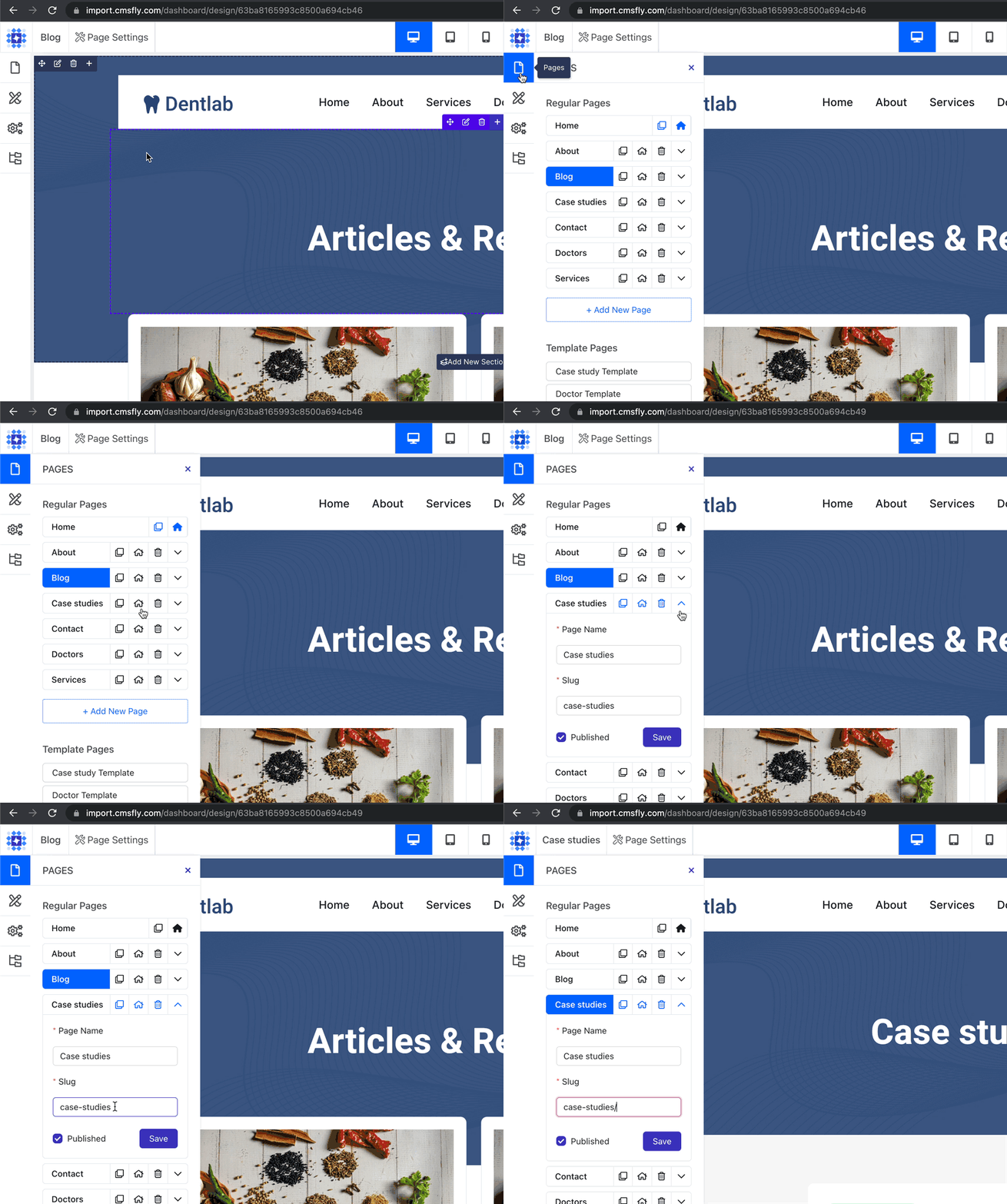

The URL of the page shown above after adding multi-slug
Ground Rules
There are some ground rules for adding Multi Slug on regular pages, here are the rules:
- A slug can not start with a “ / “
- A slug can not end with a “ / “
- Two adjacent “ / ” (e.g abc.com/en//fr) will not work, at least one alphanumeric character should be present in between
- A slug should start with at least one alphanumeric character
Related Articles
📑 Save Page as Draft📄 Page SettingsAi nevoie de ajutor? Scrie-ne.